Showing posts with label mac. Show all posts

LATEX Equation Editor

La TeX Equation Editor
LaTeXit
In an earlier post I mentioned LATEXiT, by Pierre Chatelier. The LATEX Equation Editor is similar in function—and not entirely dissimilar in appearance.
I'm not sure yet which I prefer. Both are free—try both. If you already downloaded LATEXiT last year, make sure you try the latest version.
If you have a Fink tetex installation, you must set the preferences for LATEX Equation Editor to specify that LATEX is in /sw/bin/ and ghostscript in /sw/share.
LaTeX Equation Editor prefences See also mimetex and LATEX render.

Shockwave & Flash for Intel Mac

The latest Universal Binary Flash Plugin (9,0,28,0) now works in Safari 2.0.4 (419.3) — see Flash Player Update

A Universal Binary Flash Plugin is available, but Shockwave is still PPC only. Solution: run Safari in Rosetta.

Download the latest version! (as of 20060910: 9.0 r20 for Intel; 9.0 r16 for PPC)

Battery AWOL

Suddenly my MacBookPro 15" doesn't think it has a battery. Energy monitor menu says, "No batteries available"!

I've tried everything that Apple recommends: restart, forced shutdown and PMU reset. No joy. The battery shows 3/5 lights; the computer runs fine on AC power, but dies if this is interrupted. This is my new replacement battery from Apple - see earlier post.

Google shows me that I'm not the only one with this problem (or similar).

Scotsys were helpful as usual. We tried swapping batteries with a demo machine. This showed that the battery had the problem (I suspect that this is a battery software problem).

In any case, I now have a battery on loan while mine is returned to Apple for replacement.

I also bought a spare power supply, as the connection between DC cable and magnetic plug on the original power supply is starting to fray.

Update

New battery and new power brick have been working fine for a few months now. I still love my MBP!

My audio applications have stopped working

Audio device may be in use by another application

Mac OS X: No audio from certain multimedia content

This may mean that one application has changed your computer's audio settings to a sample rate that is too high for other applications to use. The problem may appear when you try to play audio content from BBC or NBC in Real Player.

Apple suggests:

To use the Mac OS X audio drivers:

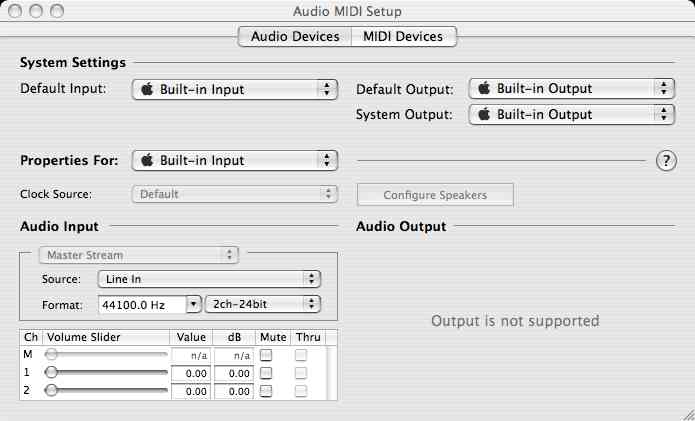
  1. Open Audio MIDI Setup and click the Audio Devices tab.
  2. Choose Default Output: Built-in Output and System Output: Built-in Output from the pop-up menus.

Then set audio output to 44.1kHz 2-channel 24-bit

  1. Under Properties for: select Built-in Output.
  2. Set the Audio Output Format to 44100.0 Hz. 2ch-24bit
  3. Quit Audio MIDI Setup.

What if it says output is not supported?


Under Properties for: choose Built-in Output

Uninstall SPSS

installer tells me that a there is still a previous version of SPSS 16 on my mac

SPSS is great, but ...

The Mac install is clunky. If you've aborted an install and want to start again, or you just want to get some space free, you have to remove the old installation.

You've removed all files and directories matching *spss* (and, for good measure, youve also tried *SPSS*), and you can't start again because the installer complains that you haven't removed a previous installation.

remove InstallShield (probably sitting in your home directory) and start again!

If you want to get rid of an older version, and you haven't yet started, use the uninstaller installed with SPSS,

SPSS know about the problem

They say:

Problem Subject: Trying to install SPSS 16 for the Mac yields an error message that there is already a previous flavor

Problem Description: I am trying to re-install SPSS 16 for the Macintosh and I am unable to do so because during the installation I am met with an error message telling me that there is already a previous flavor of SPSS on this machine and that it must be removed before a new install can take place. What is the reason for this message and how can I resolve this so that I can install SPSS 16 for the Macintosh?

Resolution Subject: Completely remove the previous installation of SPSS 16 from this machine

Resolution Description: The reason this is happening is that the previous installation of SPSS 16 for the Macintosh was not uninstalled correctly. If you merely trashed the application folder then SPSS 16 was not uninstalled. The uninstall function is found with the SPSS 16 applcation in the 'Applications' folder. In order to resolve this issue if SPSS 16 is not removed through the uninstall process please go into the 'Users' folder on the main operating systems hard drive. In here you should find a house with your login name on it and you should go into this item. In this house (folder), please trash the following:

~/initspssmac

~/InstallShield (directory, remove the whole thing)

~/Library/Preferences/com.spss.spss for mac.plist

Now empty your trash. Now you will be able to re-install SPSS 16 for the Macintosh.

ClamAV an open-source anti-virus toolkit

Clam AntiVirus (ClamAV) is an open-source anti-virus toolkit for UNIX, released under GPL. It provides a number of utilities including a flexible and scalable multi- threaded daemon, a command line scanner and advanced tool for automatic database updates. The core of the package is an anti-virus engine available in a form of shared library.

ClamAV is included in both Fink and DarwinPorts, or can be downloaded directly from sourceforge

Configuration

You have to edit the configuration files. See the manual pages for details:

 man freshclam.conf man clamd.conf 

You have to edit both files. On a Fink install, you'll find them in /sw/etc/. For other setups, locate clam.conf should find them.

Programs

clamconf -n tells you what non-defaults are set in your configuration.
clamscan -r directory recursively scans a directory.
freshclam updates your virus definitions.

 man clamconf man clamdscan man clamscan man freshclam 

I added the following line to /sw/etc/anacrontab

   1       25        clamscan         nice /sw/bin/freshclam -quiet

When you check your imported software (for a Fink installation, do this by running the command sudo clamscan -r /sw) you should find a few ''infected'' files. For example:
/sw/src/clamav-0.91.2.tar.gz: ClamAV-Test-File FOUND
There are a few more examples in /sw/share/doc/clamav/test/. If you don't find these test cases, check your configuration.

The malware I have found is exclusively in spam mail and cached java applets.

clamdscan ˜/Library/Caches/Java\ Applets clamdscan ˜/Library/mail\ Downloads 
You can remove offending files by hand, or use the --remove option when calling clamdscan.

LATEX iT

 \pi^2 =&6\sum_{i=0}^{\infty}\frac{1}{i^2}\\
\pi^4 =&90\sum_{j=0}^{\infty}\frac{1}{j^4}\\
\pi^6 =&960\sum_{k=0}^{\infty}\frac{1}{k^6}
Series expansions for pi

This small app from Pierre Chatelier allows you to create JPG and PDF images for inclusion in your web pages, easily from LATEX math. Here you see a jpg — click the image to see the pdf.

When you generate a pdf file, LATEX iT embeds the LATEX source in the pdf, so that,later, you can paste the pdf back into this application, and edit the source. Brilliant!

MacTex

Finally, I found the solution for LaTeX on the Mac. I've been using MacTex for a month or so and it seems really solid. It has its own updater, the TeXLive utility, which allows you to keep your installation up to date. Your own local styles can be installed in ~/Library/texmf/tex/latex. BibTeX .bib files go in ~/Library/texmf/bibtex/bib or subfolders of this directory, and .bst files go in ~/Library/texmf/bibtex/bst or subfolders of this directory.

A system local texmf tree, which can be accessed by all users on a machine, can supposedly (untested by me) be placed in /usr/local/texlive/texmf-local.

This installation includes LaTeXiT, a utility I've mentioned before, that lets you easily produce PDF, EPS, TIFF, PNG, or JPEG files from LaTeX snippets. It can produce fully scalable PDFs with stroked fonts, for inclusin in presentations and posters. LaTeXiT also includes a LaTeX palette that allows you to select AMS symbols, operators, arrows, etc. from a graphical display.

LaTeXiT stores the LaTeX source within the PDF document it produces—if you want to edit your presentation later, just paste the PDF back into LaTeXiT and you can edit the source. Unfortunately, Keynote 5.0.1 doesn't seem able to access the LaTeXiT services, and LinkBack doesn't seem to work—but cut-and-paste isn't so hard.

The Grapher utility (in Applications/Utilities) also integrates with LaTex. Type a formula into Grapher, which provides a fairly intelligent wysiwyg interface (use ^ for exponents, / for fractions, "log" for log, "pi" for π, etc.). The arrow keys (all four of them) allow you to move around. Ctrl-(or right-)click on the selected equation will allow you to copy the LaTeX source for this equation (and it normally makes a better job of the latexography than I do).